2026 Ultimate Guide: How to Use AI to Create Viral Videos (Step-by-Step Tutorial)
AI video generation technology has matured. Now anyone can create a video in just a few minutes.
This guide will walk you through the entire process, from creating your first video to monetizing it commercially.
What You’ll Learn: Create your first AI video in 3 minutes and master the logic behind viral videos and monetization strategies.
Who This Is For: Beginners with no prior experience who want to quickly get started with video creation using AI.
Article Summary: Covers text-to-video, image-to-video, multi-shot storytelling, story structure, editing and sound effects, topic selection and monetization, and a guide to avoiding common pitfalls.
Written by the PixStag Content Team
Introduction: Getting Started with AI Video Creation
In the past, video creation was extremely time-consuming and costly.
Fortunately, AI technology has advanced rapidly. Now, anyone can use AI to create videos on their phone or computer.
The only “cost” is a few taps on your screen or a little brainpower.
It’s safe to say the barrier to entry is now extremely low.
I. Technique 1: Text-to-Video
Many people assume creating AI videos is difficult.
In reality, it’s not.
Open an AI video creation tool (such as PixStag), locate the largest input field, and enter the following:
A robot is running
Then wait about a minute, and you’ll get a video like this:
Pretty amazing, right?
You just typed a few words, and the tool generated a very realistic robot for you. In the past, this would have been nothing short of magic.
Now, let’s figure out exactly what happened.
The text you just entered is technically called a prompt—it tells the AI what your goal is.
As we saw earlier, you entered text and got a video in return, so this process is generally called text-to-video.
1.1 Professional Prompts
To be honest, the prompt I wrote just now was way too casual.
The results it produced were also very random.
To get good, consistent results, it’s best to structure your prompts like this:
Subject + Action + Scene + Style + Video Quality
Example Comparison: Bad Prompt vs. Good Prompt
❌ Bad Prompt
A robot is running
✅ Good Prompt
A silvery humanoid robot is running at full speed through the streets of a futuristic city, its metallic joints emitting a faint blue glow with every step, kicking up dust behind it.

Cyberpunk style, with neon lights shining on the wet pavement; a dynamic, tracking camera angle; cinematic-quality visuals; 8K; Dolby Vision.
What makes it good? A comparison table will make it clear.
| Analysis of Advantages | Explanation |
|---|---|
| Clear Subject | “Silver-white humanoid robot” → Specific color + form |
| Clear Action | “Running at full speed” → Clear sense of speed |
| Clear Setting | “Streets of a futuristic city” → Clear environment |
| Clear Style | “Cyberpunk style” → Artistic direction established |
| Specific Lighting | “Neon lights shining on a wet road” → Controllable atmosphere |
| Specific Perspective | “Dynamic tracking shot” → Defined cinematography |
| Specific Image Quality | “Cinema-quality visuals, 8K, Dolby Vision” → Output specifications guaranteed |
Let’s take a look at the optimized prompt and the generated results.
Isn’t it much better?
1.2 Advantages and Limitations of Text-to-Video
The advantages are obvious: whatever you imagine in your head, you can type it into the AI and get a video—it’s incredibly convenient.
However, there are also some limitations, such as:
-
The results vary with each generation, even if you use the exact same prompt.
-
For professional creators—such as those making short films, short dramas, or feature films—certainty is paramount. In other words, they expect the final video output from the AI to match their expectations exactly.
These are things that “text-to-video” cannot achieve.
II. Method Two: Image-to-Video
To address the shortcomings of text-to-video, researchers came up with a clever solution: using images.
In other words, when you provide the AI with text, you also give it an image. This way, when the AI generates the video, it doesn’t have to guess what the scene looks like—it simply needs to animate the image.
This is “image-to-video.”
For example, I prepared this image in advance

Then, my prompt remained the same as before
A robot is running
Then, I entered the image and text into the AI, and in just a few minutes, I got a video like the one below.
Take another look and see what you think?
2.1 Advantages and Limitations of Image-to-Video Generation
As you’ve probably noticed, the advantages of using the image-to-video method are quite obvious.
The final video closely resembles the image you provided.
This is significant for creators: having an image first allows you to visualize the approximate final video, thereby avoiding rework and wasted costs.
However, it also has its drawbacks and limitations.
-
You must prepare the image in advance
-
The final video is highly consistent with the image you provided, which limits flexibility.
III. Method Three: Reference-Based Video Generation
Given the limitations of image-to-video generation, researchers have developed another method for generating videos: reference-based video generation
It differs from “image-to-video” in several ways, as shown in the table below
| Dimension | Image-to-Video | Reference-Based Video |
|---|---|---|
| Input Method | Single complete image | Image/audio/video as one of the source materials |
| Visual Control | Highly consistent, almost a direct copy of the image | Retains specified elements; the rest is filled in by AI |
| Degree of Freedom | Low | High |
| Applicable Scenarios | Product showcases, close-ups of people | Multi-character narratives, content with varied scenes |
It can be said that using Reference Video makes it easier to strike a balance between creative freedom and controllability.
Below, let’s look at an example. I’ve prepared these two images of people
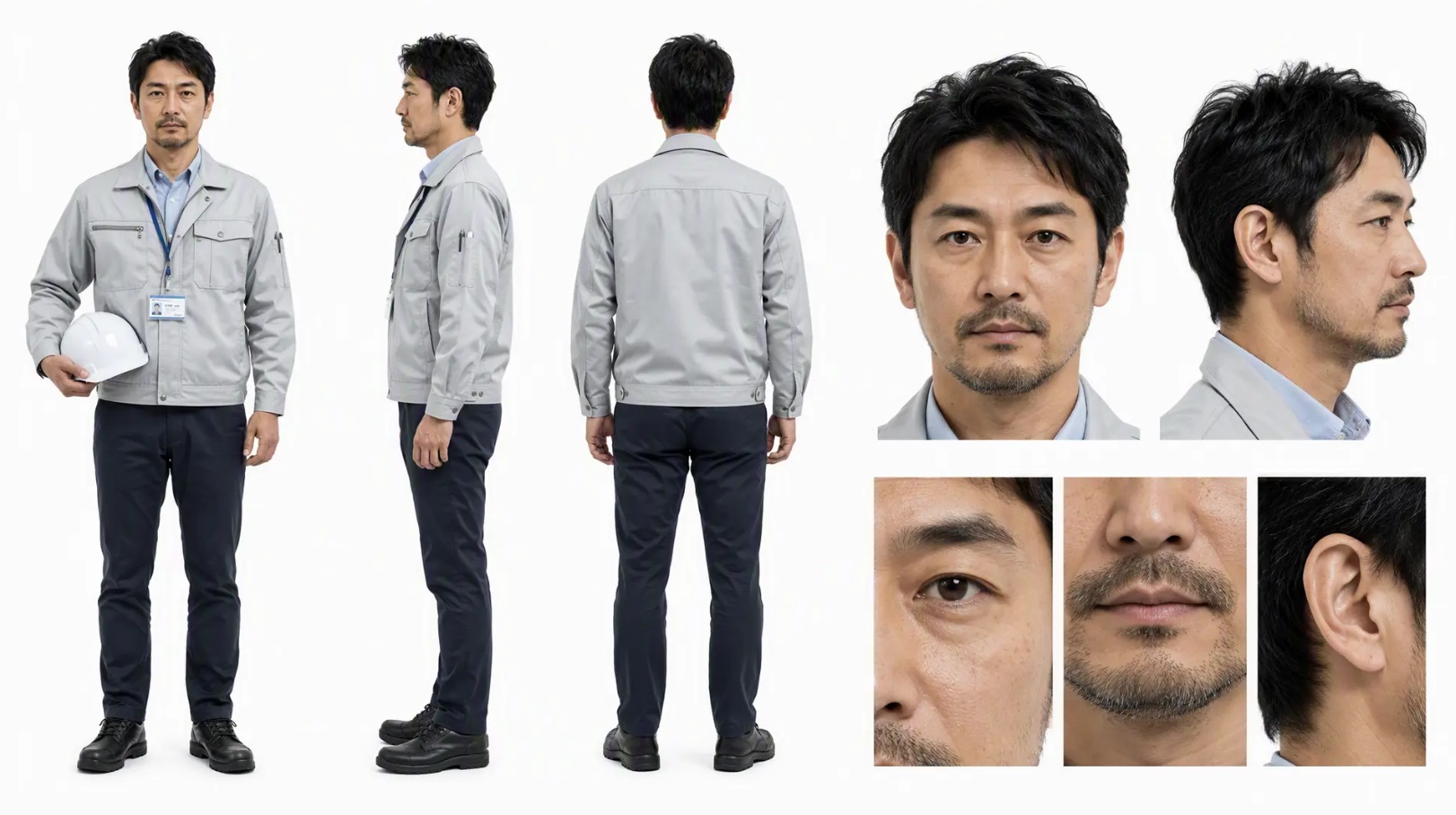
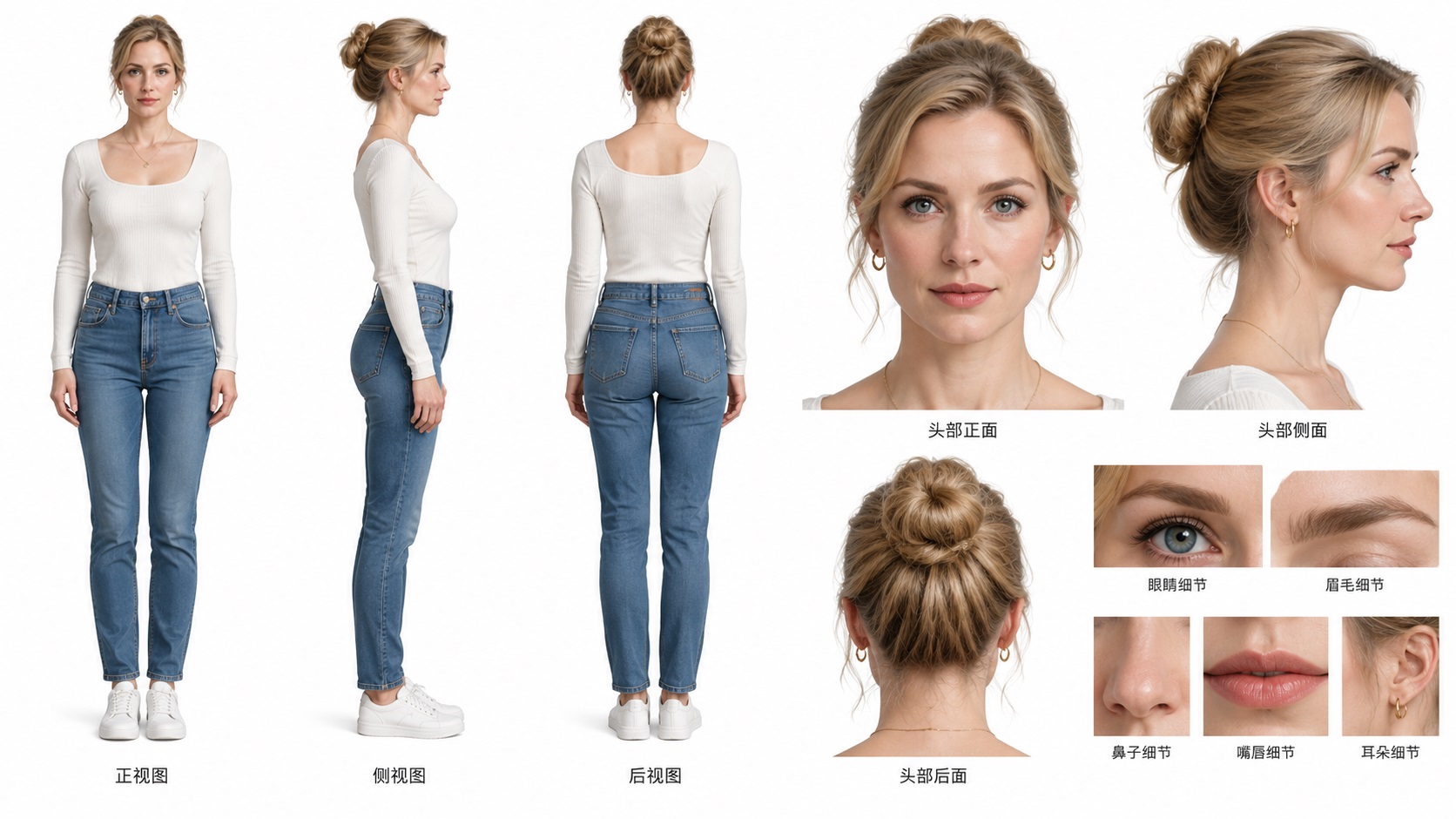
Now, I’ll upload these two images to PixStag, select the All-in-One Reference type, and enter the following text
subject_definitions:
Man: Appears as in <Picture 1>
Woman: Appears as in <Picture 2>

detailed_description:
Mid-shot: A man and a woman are arguing in their home.
Then click “Generate,” and you’ll get the following video.
Using the same process, let’s replace the text content with
subject_definitions:
A man, as shown in <Picture 1>
A woman, as shown in <Picture 2>

detailed_description:
Mid-shot: A man and a woman are walking in a park.
Then click "Generate," and you’ll get the following video.
Comparing these two videos, what do you notice?
-
The scenes in the two videos are completely different.
-
I didn’t provide the AI with any images related to the scene; it added the scene on its own.
-
The characters’ appearances haven’t changed.
To sum it up: the elements we want to remain constant—such as the characters’ appearances—are preserved, while the elements we want to change—such as the background—can be easily altered.
This is the balance between flexibility and controllability that we mentioned earlier.
By the way, when using reference material to generate videos, the source material can be not only images but also audio or video clips.
For example, using a single image of a person combined with an audio recording can generate a “talking digital avatar.” If you’re interested, give it a try yourself.
IV. Technique 4: Multi-Shot Narrative
With the foundation laid by the first three stages, you’re actually ready to create videos.
However, to improve efficiency, it’s still important to understand multi-shot narrative.
As shown in the previous demonstration, every time you generate a video, you need to enter a prompt, upload images, and provide reference materials.
Obviously, if you want to create multiple shots or clips, you’ll have to repeat this process multiple times—which is clearly a bit of a hassle.
So, the developers came up with a solution: multi-shot generation
In other words, this allows the AI to generate multiple clips at once and automatically string them together, which can significantly reduce the workload.
For example: Let’s use those same two images from earlier.
Then, enter the following text and select All-Purpose Reference:
subject_definitions:
Man: Appears as in <Picture 1>
Woman: Appears as in <Picture 2>

detailed_description:
[Short 1]  Close-up  Woman’s POV  0–3 seconds   The woman says angrily: “Zhang Mo, I’m divorcing you!”
[Short 2]  Close-up  Man’s POV  3–6 seconds   The man says angrily, “Fine, let’s get a divorce. Who’s afraid of whom?”
Before long, we’ll get the following video
Did you notice? Around the 3-second mark, there’s a distinct camera cut. The shot starts on the woman and then shifts to the man.
This way, a single video can incorporate multiple shot effects, greatly improving production efficiency.
By the way, I’ve only used two “Shorts” here, but you can actually use many more.
V. Technique 5: Telling a Good Story
After going through the previous sections, you should now be able to create some short videos. Congratulations—you’ve mastered the basic skills of video creation.
In this section, we’ll cover some core concepts.
Have you ever wondered why a video, a movie, or a TV show is so compelling?
You might come up with many answers—such as compelling characters, great acting, beautiful visuals, excellent sound design, and so on.
The most crucial element—and the one that many outstanding creators, including great directors, strive for—is storytelling.
Think about it: do the works you’ve seen and remembered align with this element?
With that in mind, since you’ve already mastered the basic skills of video creation, don’t let them go to waste—use them to tell stories.
Only then will your work have the potential to go viral, and only then will you be able to achieve your commercial goals.
5.1 The General Structure of a Good Story
If you’re just making a short clip and going with the flow, that’s perfectly fine.
However, if your content is a bit longer, you’ll need to consider the story’s structure.
It’s like building a house—you must have a structure and blueprints; you can’t just wing it, or you’ll run into problems.
This is a professional field, but after so many years of development, much of this specialized knowledge has become accessible to the general public.
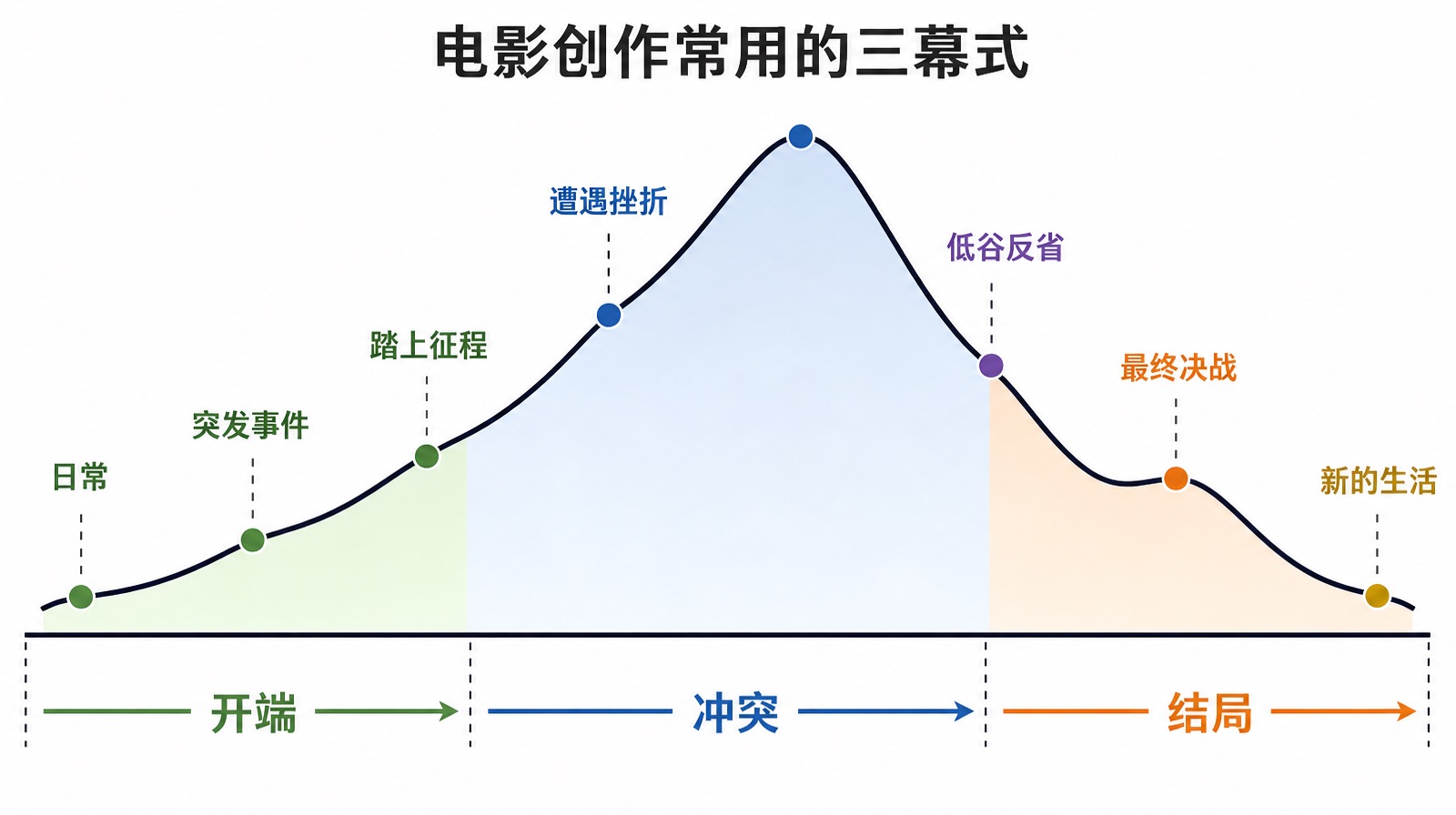
If you want to make a movie, you should at least be familiar with the three-act structure commonly used in filmmaking:
Act I: The Exposition. This introduces the story’s world, the main characters, and their daily lives.
Act II: The Conflict. The protagonist faces a series of obstacles and struggles against the antagonist or the problem at hand.
Act Three: Resolution. The protagonist confronts the final obstacle, and all suspense is resolved. The resolution of this conflict provides the audience with a sense of final satisfaction and meaning.
Tip for Beginners:
If this is your first time learning about story structure, it’s enough to remember a very simplified version for now:
Daily Life → Sudden Event → Embarking on a Journey → Facing Setbacks → Reflection at Rock Bottom → Final Showdown → New Life
Once you’ve mastered this, take a look at renowned screenwriter Blake Snyder’s 15-beat chart in Save the Cat! for a deeper understanding.
| Beat Number | Beat Name | Act | Core Function & Content |
|---|---|---|---|
| 1 | Opening Shot | Act I | Presents a “snapshot” of the protagonist’s daily life, visually illustrating their predicament, personality, or shortcomings. Forms a stark contrast with the closing shot. |
| 2 | Theme Introduction | Act 1 | Typically, a supporting character poses a question or argument related to the story’s central theme through dialogue (e.g., “Life requires adventure” or “Trust is dangerous”). At this point, the protagonist remains unconvinced. |
| 3 | Setup | Act 1 | A detailed introduction to the protagonist, his character flaws, and his inner need for change. It also features a “kitten-rescue” moment (i.e., the protagonist does something that makes the audience like him). |
| 4 | Catalyst | Act 1 | This is the “inciting incident” in the three-act structure. A sudden piece of news or event completely shatters the protagonist’s peaceful life, forcing him to react immediately. |
| 5 | Conflict | Act I | The protagonist experiences inner turmoil and resistance; he might say, “No, I don’t want to change; I don’t want to get involved.” This is his final struggle before entering a new world, demonstrating through his actions his fear of change. |
| 6 | Act II Transition | Act I → Act II | This is “Plot Point I” in the three-act structure. The protagonist makes a major decision and actively steps into an “opposite world” or a new journey—with no turning back. The story moves into Act II. |
| 7 | B-Story | Act II | A subplot is introduced, typically involving emotional relationships (romance, friendship, mentor relationships). It carries the story’s theme and serves as the key driving force behind the protagonist’s inner transformation. |
| 8 | Playtime | Act II | This is the main source of material for movie trailers! The protagonist has a blast (or suffers greatly) in this new world, and the audience enjoys the thrill of this “promise” (such as showing off superpowers or solving crimes and chasing down villains), while the conflict remains temporarily under control. |
| 9 | Midpoint | Act II | The most important turning point in the entire film! It’s either a “false victory” (the protagonist seems poised to win) or a “false defeat” (the protagonist seems on the verge of collapse) . But regardless of which, the stakes are raised, and the protagonist shifts from reacting passively to taking the initiative. |
| 10 | The Villain Closes In | Act II | After the midpoint, the villain’s forces begin to rally, and the challenges grow increasingly severe. External enemies and internal conflicts (problems with the B-story) exert pressure simultaneously, trapping the protagonist in a predicament. |
| 11 | Losing Everything | Act II | The darkest moment of the film. The protagonist suffers a crushing defeat, often accompanied by a metaphor for “death” (such as the death of a companion or the shattering of a dream). Their core beliefs are shattered, and the protagonist feels despair. |
| 12 | Dark Night of the Soul | Act II | The protagonist struggles at rock bottom, licking their wounds, and engages in deep reflection and introspection. Here, they come to realize what truly matters (i.e., the truth of the theme) and prepare for the final showdown. |
| 13 | Act III Transition | Act II → Act III | This is “Plot Point II” in the three-act structure. Armed with a new plan, new convictions, or new allies, the protagonist decides to take action once more, actively charging toward the final showdown to resolve the conflict. |
| *14 * | Conclusion | Act III | Final Climax. The protagonist faces off against the ultimate antagonist (or final obstacle) of the new world. Applying the lessons learned during the “Dark Night of the Soul,” the protagonist completes their transformation, defeats the antagonist, and resolves the central conflict. |
| 15 | Closing Scene | Act III | Mirrored against the opening scene, this shot showcases the changes in the protagonist and the world. Both the protagonist’s “external success” and “internal growth” are ultimately realized. |
Special Note
The Save the Cat! beat sheet is a “practical guide” designed for Hollywood commercial genre films and is highly effective. However, if you’re writing an art film, auteur film, or experimental film, feel free to adjust it flexibly—there’s no need to apply it rigidly.
The page numbers in the table represent an idealized model; many excellent films may deviate from these figures, but the overall proportions generally remain within this range.
VI. Technique 6: Editing and Sound Effects
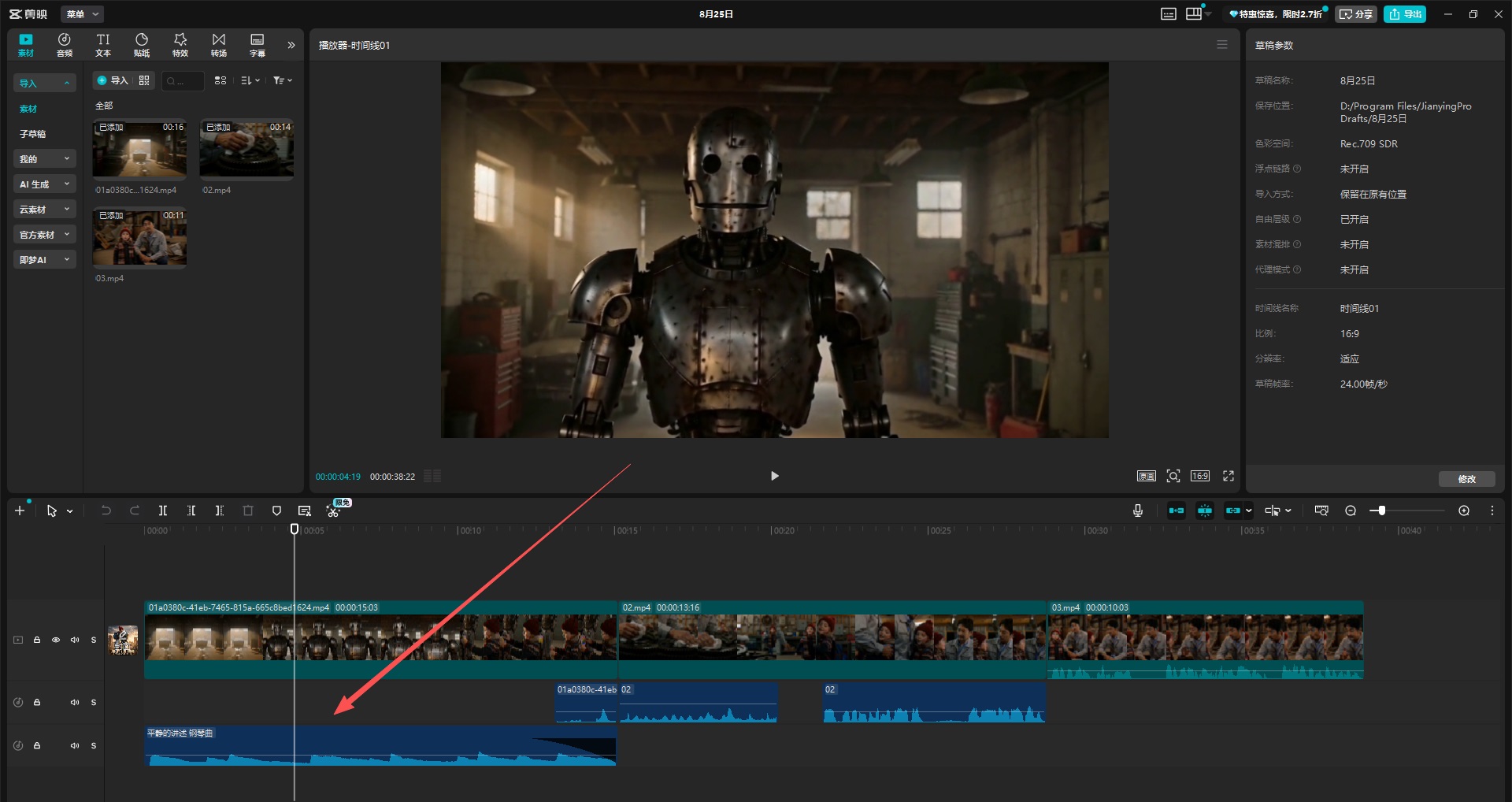
Once you have a good story and plenty of video clips, the final step is to piece them together.
The editing process is relatively straightforward: simply connect related content end-to-end based on your previously created beat sheet.
Another key element here is sound effects.
This is a matter of attention to detail—good sound effects can enhance the overall impact of your work.
For example, background music, footsteps, the clang of metal, the sound of wind, the sound of rain...
Adding these details will make your work feel more polished.
By the way, videos generated by PixStag include background music and sound effects by default, so this part of the process will be much easier for you.
However, keep one thing in mind: when generating the video, it’s best to have it include sound effects but no background music.
This is because, in most cases, you’ll add background music to multiple clips at the same time during the final editing stage.
As for how to remove background music, please refer to: Pitfall Guide – How to Remove Background Music
VII. Technique 7: Choosing Viral Topics and Monetization
With the information above, you’re fully equipped to complete a video.
Now, you’re just one step away from creating a viral video: choosing the right topic.
For example, if you’re making a commercial entertainment film, your audience will certainly be much larger than that of an art-house film.
If you want to create viral content, you need to give this careful consideration right from the topic selection stage.
7.1 Timeless Archetypes for Viral Stories
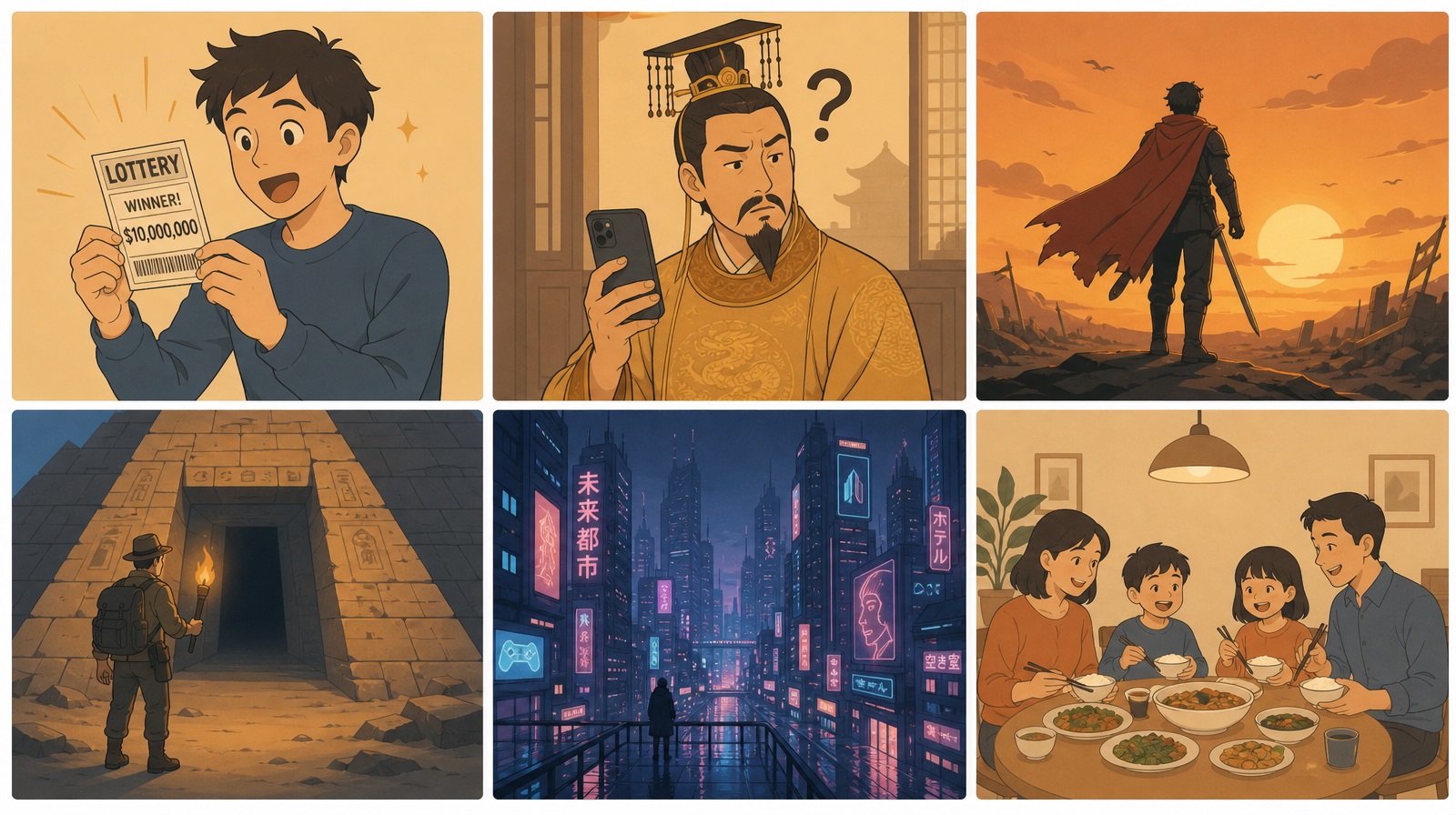
Looking back at the history of global film, television, and literature, the most popular stories often revolve around the same core themes. These story archetypes, which have been market-tested over decades or even centuries, are equally applicable to AI video creation.
I’ve compiled six universally popular story archetypes and included corresponding examples from the international AI video industry:
Archetype 1: An Ordinary Person Suddenly Becomes Rich / Gains Superpowers
This satisfies the audience’s desire for a reversal of fortune.
Classic Movies: The Great Gatsby, Spider-Man, Captain America
Overseas AI Examples: The numerous AI-generated “rags-to-riches” short series on TikTok, where a poor boy becomes a billionaire, frequently surpass 100 million views and are a staple genre on the AI short-form video platform ReelShort.
Archetype 2: Identity Mix-ups and Unforeseen Adventures
Creates dramatic conflict and comedic effects.
Classic Movies: Titanic (a rags-to-riches story featuring a commoner and an aristocratic woman), Overnight Millionaire
Overseas AI Examples: AI-generated comedy shorts—such as “an ancient emperor time-traveling to the modern era” and “a beggar mistaken for a millionaire”—are extremely popular on TikTok; the creator behind the “Deep Fantasy” series has gained over a million followers as a result.
Archetype 3: The Hero’s Transformation and Redemption
Showcases the brilliance of human nature and personal growth.
Classic Movies: Iron Man, Batman, Schindler’s List
Overseas AI Examples: AI-generated short films featuring plots such as “a school bully’s repentance” and “a cruel boss being reformed” consistently attract high view counts on YouTube and are frequently used in emotional brand advertisements.
Archetype 4: Adventure and the Unknown World
Stimulates viewers’ curiosity and spirit of adventure.
Classic Movies: Indiana Jones, Jurassic Park
Overseas AI Examples: AI-generated mockumentary-style videos such as “Deep Inside a Mysterious Pyramid” and “Exploring an Alien Jungle” have accumulated over 1 billion views on TikTok.
Archetype 5: Science Fiction and Visions of the Future
Explores grand themes of technology and the fate of humanity.
Classic Movies: Alien, The Matrix, Interstellar
Overseas AI Case Studies: AI-generated concept shorts such as “Daily Life in a Cyberpunk City” and “A World After AI Awakens” have gone viral on Instagram Reels.
Archetype 6: Emotions and Family
Taps into the most universal emotional resonances of humanity.
Classic Films: The Pursuit of Happyness, Coco
Overseas AI Case Study: YouTube creator SuperCatPapa’s AI-generated short series featuring a white cat garnered 2 million subscribers in four months. Its core appeal lies in projecting emotions such as “family bonds,” “companionship,” and “home” onto a pet character, thereby transcending language and cultural barriers.
Core Philosophy: These story archetypes are like the inner principles of martial arts, while AI technology is the technique. If you only learn the techniques without mastering the principles, you’re likely to just follow the crowd; but those who have mastered the principles can use AI—this new technique—to tell those classic stories to audiences around the world.
However, this doesn’t mean you’ll automatically go viral just by choosing these directions.
It simply means that these directions have been extensively validated by the market, and you can draw inspiration from and learn from them. You must develop your own narrative and convey your perspectives and values through your stories.
7.2 Monetization Pathways
When it comes to monetizing AI videos, is far more mature in overseas markets than in China, and the per-view rates are significantly higher. Below are four paths that have been proven viable:
Path 1: TikTok Short-Form Drama Revenue Sharing (The Most Direct Way to Monetize Overseas)
TikTok is actively supporting AI short-form drama content, offering incentive multipliers of up to 20x with no cap on revenue sharing.
Real Data:
In May 2026, total monthly revenue sharing for TikTok short-form dramas reached $21 million, with AI short-form dramas accounting for $6.5 million of that amount
18 AI short dramas generated over $50,000 in revenue in a single month, with several titles exceeding $100,000
The top-performing title, Bestie, I’m Going to Fight Back, generated $180,000 in revenue within half a month of its release
Path 2: Overseas Short-Form Video App Subscriptions (Most Stable Cash Flow)
Upload AI short-form videos to overseas platforms such as StoReel, FreeReels, and ReelShort to generate revenue through user subscriptions.
Real Data:
FreeReels (Kunlun Wanwei) recorded over 32 million downloads in a single month, with nearly 1,000 AI short dramas uploaded to date
ReelShort’s revenue reached $332 million in 2025, while DramaBox’s reached $295 million
Subscription pricing in North America ranges from $20 to $30 per week—several to dozens of times higher than in China
Cost comparison: A single live-action short drama costs over 1 million yuan, while an AI short drama costs only 20,000–30,000 yuan—a 50-fold cost difference that makes the business decision a no-brainer.
Path 3: YouTube Ad Revenue Sharing (Best for Individual Creators)
Serialize AI short dramas or content series on YouTube to earn a stable income through ad revenue sharing.
Real-Life Example:
YouTube creator SuperCatPapa serialized an AI-generated short series featuring a white cat, gaining over 2 million subscribers in 4 months, with a single video reaching over 150 million views at its peak.
Combining ad revenue sharing with brand partnerships, monthly income can reach hundreds of thousands of dollars.
# Path 4: Custom Brand Ads (The Most Profitable Monetization Method)
Once your AI character or content series has built a fan base, brands will actively reach out to commission custom ads.
Real-Life Example:
AI pet drama Her Highness the Bichon: She Rules the World: 80,000 yuan per custom video
AI virtual character “Fang Taozhi”: 258,000 yuan for ads longer than 60 seconds
A comedy star licensed their AI avatar for product endorsements, generating a total of 6 million yuan in a single quarter
Monetization Strategy: Overseas users are willing to pay for AI content, with rates 5 to 10 times higher than in China. An AI short series with a production budget of 20,000–30,000 yuan can earn back $180,000 in just half a month through TikTok revenue sharing. Currently, production of live-action short series overseas has decreased by 30%–50% year-over-year, and funding is shifting massively toward AI. TikTok’s support policies are now fully open—this is the best time to enter the market.
VIII. Technique 8: Guide to Avoiding Pitfalls
Q1: Why do spliced videos always skip frames?
A: In many cases, this is because you’re using the “first-and-last-frame” technique to create your videos. You want to use the final frame of one clip as the first frame of the next to make the video flow more smoothly.
The root cause is that the first frame of an AI-generated video isn’t an exact match for your source image, and the human eye is quite sensitive, so it can detect this discrepancy, resulting in frame skipping.
The solution is to plan your shot sequence carefully and minimize the use of first and last frames.
Use changes in shot composition, camera angle, or even the subject to avoid this issue.
Simply put: Avoid using exactly the same composition in two adjacent shots. By changing the shot size or camera angle during transitions, the frame-skipping issue will be significantly reduced.
Additionally, it’s worth noting that the “first-and-last-frame” technique (where you specify the first and last frames of a video, allowing AI to automatically fill in the intermediate process between them) is an extension of image-to-video generation.
Q2: What should I do if a character’s appearance is inconsistent from one frame to the next?
A: For a single character, use the same reference image.
However, even when using the same reference image, inconsistencies may still occur.
In this case, you’ll need to process the reference image—for example, by retaining only a front-facing face from the reference image, specifically the one with the largest area.
Use Photoshop or an AI image-masking tool to crop out other characters or excess facial features, retaining only a large, front-facing headshot of that character.
Q3: Are there copyright issues with AI-generated videos?
A: Please ensure that the reference images, character names in your prompts, background music, and other elements you use do not infringe on the rights of third parties.
Different platforms have different rules regarding AI-generated content; please review the relevant regulations for each platform before publishing.
Q4: How do I remove the background music?
A: Videos generated by PixStag by default do include background music.
Generally, no further action is needed.
However, if you’re creating narrative-based content, you may prefer not to use the default background music.
The solution is simple: just add the following at the end of your prompt.
non_diegetic_music:
N/A
Alternatively, use Chinese:
非叙事性音乐:
N/A
Conclusion: Start Creating Your First Short Film
At this point, you’ve mastered the entire process—from concept to story structure to production.
Now, set this article aside and do these three things:
-
Sign up for an account at https://pixstag.com
-
Write a 30-character prompt using the format “subject + action + scene + style + video quality”
-
Generate your first 5-second video
Don’t strive for perfection—just get it done. Your first creation starts with these 5 seconds.
Here’s hoping your video goes viral soon.